· navigation · 8 min read
Gaia GPS vs onX Offroad: Our 2026 Head-to-Head
It has been five years since our last full comparison and a lot has changed. onX Offroad finally added real route planning and turn-by-turn navigation, while Gaia GPS joined the Outside family. Here is where the two apps stand in 2026 — and which one we still reach for.
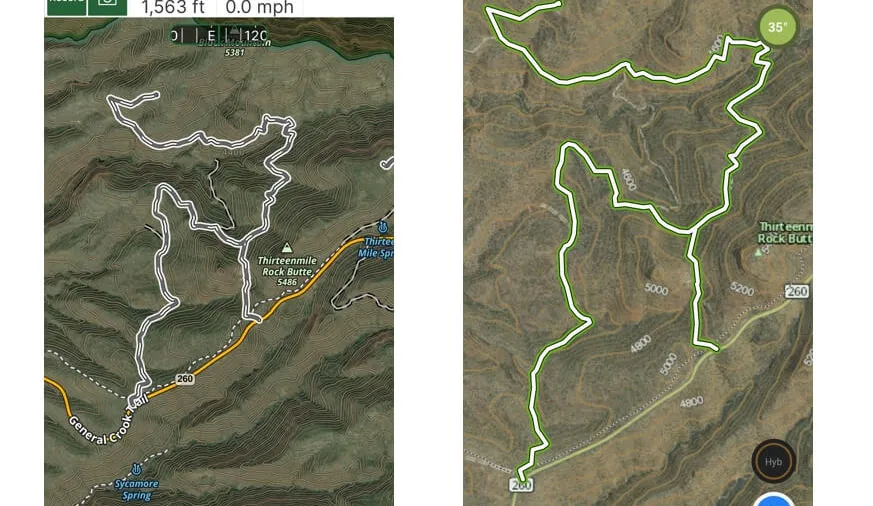
It has been five years since our first comparison and a little over four since our full Gaia GPS vs onX Offroad review. Both apps have changed a lot in that time, so we think it is time for a fresh, 2026 head-to-head. We have been using Gaia GPS for over 13 years and onX Offroad since the day it launched. We pay for both, we use both in the field, and we still compare every navigation app we touch to Gaia GPS.
Short version: onX Offroad has closed a lot of the gap. The two biggest knocks we had against it in 2021 — no route planning and no turn-by-turn navigation — are gone. For overlanders who like to build their own routes and live in map data, Gaia GPS is still our pick. For folks who want to open an app, pick a documented trail, and drive it, onX Offroad is now a genuinely strong, plug-and-play option.
- Safe Travels
What’s Changed Since Our Last Review
A quick recap of the big moves on both sides since 2021, because they matter to the verdict:
- onX Offroad added Route Builder. It now has a snap-to-trail route planner that strings together a network of trails and roads into a multi-day route you can save, edit, and share. In 2021 onX offered no route planning at all. This is the single biggest change.
- onX added turn-by-turn navigation. You now get audio and visual directions along your planned route, and it works offline once your maps are downloaded. Previously you had to copy coordinates into Google Maps by hand.
- onX expanded its layers. Beyond topo and satellite, it now carries condition layers like wildfire smoke, air quality, historic wildfires, and precipitation radar, plus a Dispersed Camping layer built on USFS data.
- onX became the official BDR navigation app. The Backcountry Discovery Routes folks now point riders and drivers to onX, where the official BDR tracks used to be a Gaia/RideBDR story.
- Gaia GPS joined Outside. Gaia is now part of the Outside Inc. family, and the headline subscription is the Premium with Outside+ bundle, which folds in Trailforks Pro and a pile of Outside media.
So the question is no longer “does onX even do route planning.” It is “which app’s approach fits how you actually travel.”
Pricing in 2026
Pricing is close enough that it should rarely be the deciding factor.
- Gaia GPS Premium runs about $39.99/year, which unlocks the full map catalog and offline downloads. The Premium with Outside+ bundle is around $89.99/year and adds Trailforks Pro plus Outside’s media library. (Gaia has nudged prices up over the years, so check current rates before you buy.)
- onX Offroad is $34.99/year for Premium and $99.99/year for Elite (or $14.99/month). There is a 7-day free trial if you want to test it before committing.
Both are a rounding error compared to a dedicated hardware GPS, and both run on phones and tablets you already own. If you want the broadest media and cross-sport value, the Gaia + Outside+ bundle is the better deal. If you just want off-road navigation and nothing else, onX Premium is the cheaper entry point.
Map Data and Layers
This is still Gaia GPS’s biggest structural advantage. Gaia offers 250+ maps and overlays, including more than a dozen aimed squarely at off-pavement travel — multiple topo layers, NatGeo, MVUM, USFS roads and trails, slope angle, hill-shading, public and private land, and more. Crucially, Gaia lets you stack layers and dial their opacity, so you can put MVUM data over satellite imagery and add a slope-angle shade on top.
onX has come a long way, but it is still a more curated, opinionated set: topo, satellite, and hybrid base maps with public land and MVUM data baked in, plus the newer condition layers (smoke, AQI, wildfire history, precipitation) and the Dispersed Camping layer. It does not offer the same free-form layering or anywhere near the raw layer count.
Bottom line: if you love map data and want to build your own picture of the terrain, Gaia wins clearly. If you want a clean, curated map that just works, onX is more than enough.
Trail Discovery and Curated Content
This remains onX’s home turf. onX advertises 650K+ miles of trails with featured routes that include photos, difficulty ratings, and descriptions. If you are new to an area or new to off-roading, opening onX, browsing nearby documented trails, and hitting the road is genuinely excellent. That ease of discovery is the reason a lot of people choose it.
Gaia’s answer is breadth plus partnerships. Its public trail database is enormous but not cleanly segmented by vehicle vs. hiking, so it takes more of your own research. Where Gaia shines for curated content is its partnership with Trails Offroad — each route is documented with a GPX track, waypoints, difficulty rating, conditions, and reviews, with one-click import into Gaia. A Trails Offroad membership is a separate annual fee.
One caution that has not changed: curated trail data ages. We have flagged closed trails in onX before; always verify current conditions and closures with the managing agency, regardless of which app you use.
Route Planning and Navigation
In 2021 this section was a blowout in Gaia’s favor. In 2026 it is a real contest.
Gaia GPS still has the more powerful planning workflow, especially on the gaiagps.com web dashboard, where building, editing, and organizing multi-day routes on a big screen is excellent. It is what we use to plan our trips, and it is hard to beat for the build-your-own crowd. (See our planning article.)
But onX now has Route Builder with snap-to-trail, turn-by-turn directions, and offline routing. For someone who wants to chain together known trails and roads into a route and get guided down it, onX’s flow is clean and capable. It is no longer a reason to dismiss the app.
Bottom line: Gaia for deep, custom, dashboard-driven planning; onX for fast, trail-snapped routing that anyone can pick up.
Offline Maps
Both apps work fully offline once you have downloaded your area, and both let you choose a detail/resolution level. The difference is flexibility.
Gaia gives you three ways to download: select an area with a detail level, download along a specific track, or draw a custom polygon — and you can download your stacked layers. onX downloads by area with low/medium/high resolution and includes the visible features for that area. It is much improved over the old, tedious experience we complained about, but Gaia’s polygon and per-track downloads still give you finer control.
Waypoints and Customization
Gaia remains the more flexible app for marking up the map — detailed notes, a deeper icon set, photos attached to waypoints, and customizable track colors. onX supports waypoints, photos, and tracks too, and its trail-detail screens are clean and nicely formatted, but power users will hit Gaia’s ceiling later.
CarPlay and Android Auto
Both apps now support Apple CarPlay and Android Auto, so you can put navigation on your vehicle’s screen. This used to be a Gaia advantage; it is now table stakes.
So Which Should You Choose?
- Choose Gaia GPS if you like building your own routes, you want hundreds of stackable map layers and serious map data, you plan on a big screen at home, and you value flexible offline downloads. This is us.
- Choose onX Offroad if you mostly want to find and follow documented trails, you want the simplest plug-and-play experience, you ride official BDR routes, or you are newer to off-roading and want curated trail content out of the box.
- Honestly? Many people run both. They are cheap enough that keeping onX for trail discovery and Gaia for planning and map depth is a perfectly reasonable combo, and it is what a lot of serious travelers do.
We still deem Gaia GPS our “Gold Standard,” and it is the app we reach for first. But onX Offroad has earned real respect in five years. Competition is good, and the off-road and overlanding community is the winner.
We pay for both and will continue to evaluate each application in 2026 and beyond.
If you think we got anything wrong, send us a message and we will gladly review and correct it.
The 2026 Comparison Chart
| Feature | Gaia GPS | onX Offroad |
|---|---|---|
| Annual price | ~$39.99 Premium / ~$89.99 with Outside+ | $34.99 Premium / $99.99 Elite ($14.99/mo) |
| Free trial | Free tier available | 7-day Premium trial |
| Map layers/overlays | 250+, including 12+ off-road oriented | Topo, satellite, hybrid + condition & dispersed camping layers |
| Stack/layer maps | Yes, with opacity control | No |
| Curated trail content | Via Trails Offroad partnership (separate fee) | 650K+ miles, built-in featured routes with photos & ratings |
| Route planning | Yes — app + powerful web dashboard | Yes — Route Builder with snap-to-trail |
| Turn-by-turn navigation | Yes | Yes (offline capable) |
| Offline maps | 3 methods: area, along track, custom polygon | By area, low/med/high resolution |
| Waypoint customization | Extensive (icons, notes, photos) | Good (photos, tracks, clean detail screens) |
| CarPlay / Android Auto | Yes | Yes |
Disclaimer: We are a Gaia GPS affiliate and have done consulting work with Gaia GPS in the past. Some would say that makes us biased. We are not paid to write reviews, and we pay for the apps we test (we keep active subscriptions to both). Gaia provides us a complimentary Premium subscription, and we earn a small affiliate fee when readers subscribe through our links — that income covers hosting and the cost of testing other products. None of it changes what we write. If any company gives us a product or service to review, we always disclose it, and we give an honest review whether the result is favorable or not.
If you found this useful and want to save on a Gaia GPS membership, visit gaiagps.com/4xoa to get a discount (we receive a small affiliate fee). To learn more about Trails Offroad, visit TrailsOffroad.com. To check out onX Offroad, visit onX Offroad — we don’t have a discount available there.
All product names, logos, and brands are the property of their respective owners.